Showing posts with label VM News. Show all posts

Wednesday, March 31, 2010

Cool new HA feature coming up to prevent a split brain situation! in ESX 4 Update 2

Source - www.yellow-bricks.com

One of the most common issues experienced with VMware HA is a split brain situation. Although currently undocumented, vSphere has a detection mechanism for these situations. Even more important the upcoming release ESX 4.0 Update 2 will also automatically prevent Split Brain of H.A!

First let me explain what a split brain scenario is, lets start with describing the situation which is most commonly encountered:

4 Hosts – iSCSI / NFS based storage – Isolation response: leave powered on

When one of the hosts is completely isolated, including the Storage Network, the following will happen:
Host ESX001 is completely isolated including the storage network(remember iSCSI/NFS based storage!) but the VMs will not be powered off because the isolation response is set to “leave powered on”. After 15 seconds the remaining, non isolated, hosts will try to restart the VMs. Because of the fact that the iSCSI/NFS network is also isolated the lock on the VMDK will time out and the remaining hosts will be able to boot up the VMs. When ESX001 returns from isolation it will still have the VMX Processes running in memory. This is when you will see a “ping-pong” effect within vCenter, in other words VMs flipping back and forth between ESX001 and any of the other hosts.

As of version 4.0 ESX(i) detects that the lock on the VMDK has been lost and issues a question if the VM should be powered off or not. Please note that you will(currently) only see this question if you directly connect to the ESX host. Below you can find a screenshot of this question.


With ESX 4 update 2 the question will be auto-answered though and the VM will be powered off to avoid the ping-pong effect and a split brain scenario! How cool is that

Saturday, March 27, 2010

Howmany VCP's are there in Market till now? and New VMware VCP Logo Released

 
Article Source : www.simonlong.co.uk
As you can see VMware now have a new VCP Logo. The new VCP logo has been placed out on the VCP section of the Website for you to download.

Some other VCP news from VMware:
We currently have over 53,000 VCPs, of which over 15,000 are VCP4s.  The second number is rapidly increasing since the launch of the VCP4 certification in the 3rd quarter of 2009.  Think about it, 6 months into the certification and we already have 15,000 VCP4s! 
 With that many VCP's I think it's about time I started working towards my VCDX Exams.

Wednesday, March 24, 2010

New VMware Training Courses to be released in 2010

from NTPRO.NL - Eric Sloof
According to VMware’s education roadmap we can expect some new vSphere 4 training courses to be released in 2010. The courses marked red are currently in development and course details will be updated as soon as they become available. The release date is expected to be Q1/2010.

Virtualization Generalist
• VMware vSphere: Install, Configure, Manage
• VMware vSphere: Script & Automate
• VMware vSphere: Manage Availability
• VMware vSphere: Troubleshooting
• VMware vSphere: Design
Security Specialists

• VMware vSphere: Install, Configure, Manage
• VMware vSphere: Manage and Design for Security

Performance Specialists

• VMware vSphere: Install, Configure, Manage
• VMware vSphere: Manage and Design for Performance

Virtual Desktop Administrators

• VMware vSphere: Install, Configure, Manage
• VMware View 4: Install, Configure, Manage
• VMware View: Design

Availability Specialists
• VMware vSphere: Install, Configure, Manage
• VMware vSphere: Manage Availability
• VMware Site Recovery Manager 4: Install, Configure, Test
• Business Continuity Data Recovery: Design

This is how you should explain (VMware Hotel - Funny & Informative)

If Somebody asks you, So what if the Server goes down in VMware Infrastructure


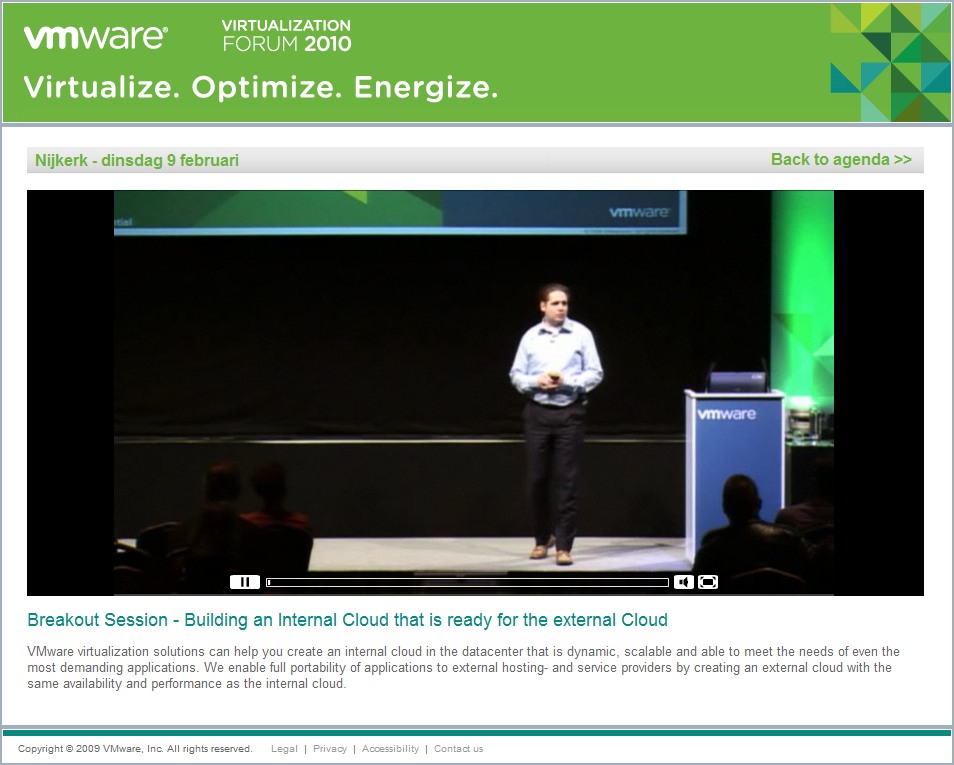
All Virtualization Forum 2010 session videos are released

All Virtualization Forum 2010 session videos are released

The session videos recorded by VMware are available at the Virtualization Forum Content Portal, by registering you will gain access to Keynote and Breakout Session records from the 2010 road show.

• Key-note : transformeer uw bedrijf met VMware
• Klantverhaal : de virtuele werkplek van PGGM
• The cloud - internal & external : bouw een interne cloud dat gereed is voor de externe cloud
• Desktop als een Managed Service
• Virtualization Management: transformeer het beheer van uw gevirtualiseerde datacenter
• Application Delivery : implementeer applicaties zonder conflict
• BC/DR : verbeter business continuity met virtualisatie
• Platinum sponsorsessies: EMC, HP, NetApp, Trend Micro
Click on below link to watch video, register you mail id, accept activation mail

http://www.vmware-forum.com/vforum/nijkerk/video/

The vmClient 4.0 is released

The vmClient 4.0 is released

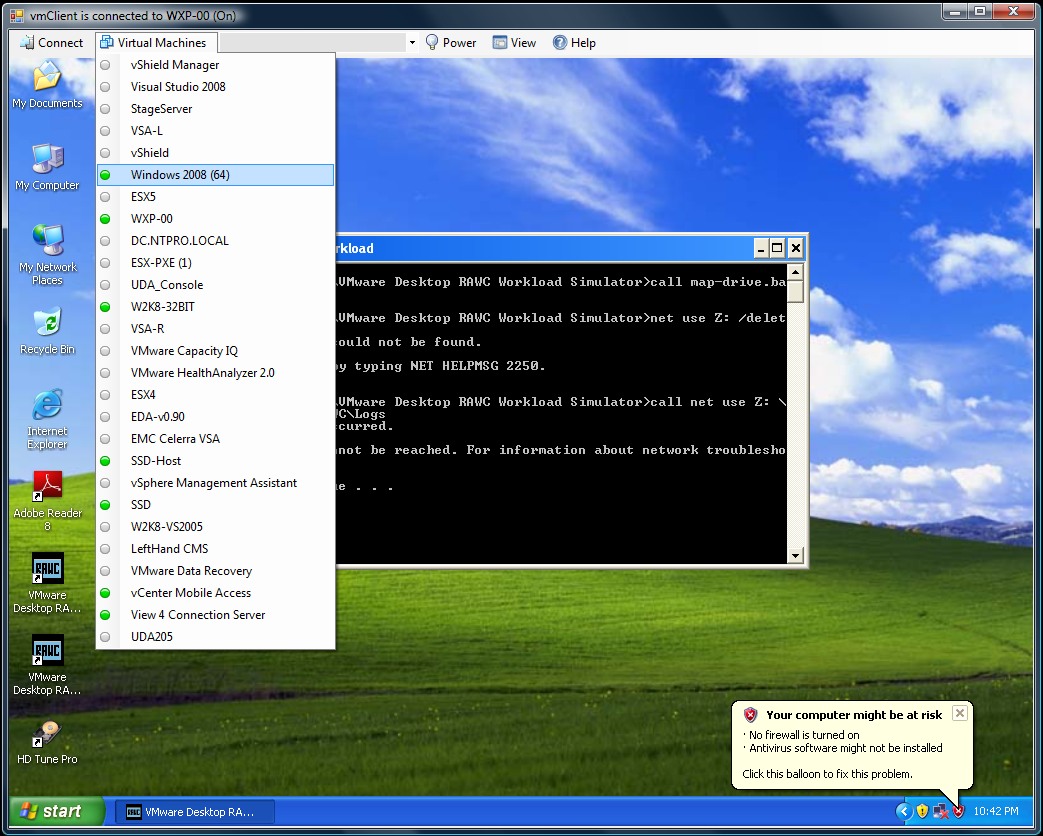
Eric Sloof just launched the vmClient 4.0 The vmClient is a lightweight tool which enables you to control the power of your virtual machines, it’s also capable of presenting the MKS console of your virtual machines. Before you can use the vmClient, you have to install the vSphere client on the same system. After starting the vmClient, you can logon to your vCenter server or individual ESX4 or ESX4i host. A list with available virtual machines will be presented after choosing the Virtual Machines menu item, you can also easily identify the power state of the virtual machines. Grey is powered off, green is powered on, yellow is suspended and red indicates that the virtual machine has an alarm. When you’re working in an RDP session there’s a menu item which can generate a Ctrl-Alt-Del in the guest OS instead of pressing Ctrl-Alt-Ins. The vmClient can run without borders in borderless mode. The menu bar has an option to search for virtual machines, just type in the first characters of your virtual machine name and the list will be filtered.

The number of virtual machines can be too high to fit in the “Virtual Machine” menu item so I’ve added an extra option to disable this menu and use the search menu instead. The option to customize the user interface of the vmClient can be done by changing a few registry settings. You’re able to show or hide menu items using this hive.

HKEY_CURRENT_USER\Software\VB and VBA Program Settings\NTPRO.NL\vmClient

You can also pre-select a default virtual machine in this hive. There are two recorded demo sessions available, one which show a walkthrough and a second which shows how to convert the vmClient into a VDI client. The trail version is limited to a maximum number of 50 virtual machines and shows a splash screen with my picture in it. The registered version can be bought online and has no virtual machine limit, you can also get rid of the splash screen. :-) The Buy Now link is available in the help menu. If you have any ideas or suggestions on improving the vmClient or you’ve found a bug, you know where to reach me. Have fun with it.

How to convert the vmClient into a VDI client
A general walkthrough
The vmClient 4.0 can be downloaded from this location: http://vmclient.nl/

VMware Labs is online and it Rocks

VMware Labs is online and it Rocks

http://labs.vmware.com/ VMware Labs is the place where VMware engineers share their cool tools. There is a wide range of tools here for you, including one for automating tasks, getting ESX performance graphs, a rich Internet application framework and much more. You really should check-out the fling section, this is too good to be true.

Fling is defined as "a brief casual relationship" as referenced on this site. The "flings" are skunkworks and ideas by VMware engineers that are not yet part of product offering. Feel free to try them and give your feedback.

Apache Pivot
Apache Pivot is a platform for building rich internet applications in Java. It combines the enhanced productivity and usability features of a modern RIA toolkit with the robustness of the industry-standard Java platform.
Dynamo RIO
DynamoRIO is a runtime code manipulation system that supports code transformations on any part of a program, while it executes. DynamoRIO gives complete control over the runtime code stream and does not limit transformations to trampoline insertion.

esxplot
The software runs on Linux systems, and generates timeseries graphs for selected esxtop fields (as png graphs). The software will also generate simple statistical measures including mean and standard variation for selected esxtop fields.

Onyx
Onyx is a standalone application that serves as a proxy between the vSphere Client and the vCenter Server. It monitors the network communication between them and translates it into an executable PowerShell code. Later this code could be modified and saved into a reusable function or script.

SVGA Sonar
SVGA Sonar is a demo application for SVGADevTap. SVGADevTap is a user-level library that communicates with the VMware SVGA guest driver to provide low-latency notifications of changes to the screen.

vApprun
The vapprun command-line tool brings the full vApp model to Workstation and Fusion. It builds vApps that contain multiple VMs or nested vApps. Configure start/stop ordering of child elements of a vApp. Power-on/power-off/shutdown of vApps.Supports OVF Properties and the OVF Environment.
vCMA
Ever wish you could restart a virtual machine or migrate it to another host from the convenience of your mobile phone? With VMware vCenter Mobile Access, you can monitor and manage VMware Infrastructure from your mobile phone with an interface that is optimized for such devices.

VGC
VMware Guest Console (VGC) is an application to manage the Guest Operating Systems installed on a VM. VGC includes a Unified Task Manager, Guest file system explorer, Snapshot Manager and a VM Manager. VGC is supported with vmware server and desktop products like vSphere, Server 2.0 and Workstation and can connect to multiple hosts simultaneously.

VI Java
The VMware vSphere Java API provides a full set of libraries to manage and control VMware virtual machines and servers. Ver 2.0 includes a high performance Web Service engine much faster/smaller than Apach AXIS.

Virtual USB Analyzer
We developed vusb-analyzer at VMware as an efficient way to debug our own USB virtualization stack. We wanted a tool that made it easy to see problems at a glance, and we wanted a way to solve both correctness and performance bugs. As a result, we ended up with what we think is a fairly unique tool. We’re excited to have the opportunity now to release this tool as open source software, under the MIT license.
http://labs.vmware.com/

VMware Guest Console (VGC)

Technology Preview - VMware Guest Console (VGC)

Cravik1 has posted two technology preview videos of the upcoming VMware Guest Console Virtual Appliance on YouTube.
VMware Guest Console Demo - Part1


VMware Guest Console Demo - Part2


VMware Guest Console (VGC) is an application to manage the Guest Operating Systems installed on VMs. VGC includes a Unified Task Manager, Guest file system explorer, Snapshot Manager, VM Manager and more. VGC is supported with vmware server and desktop products like vSphere, Server 2.0 and Workstation and can connect to multiple hosts simultaneously.

Update : http://labs.vmware.com/flings/vgc

VMware Capacity Alerts on your Desktop (Free Cool Tool)

VMware Capacity Alerts on your Desktop

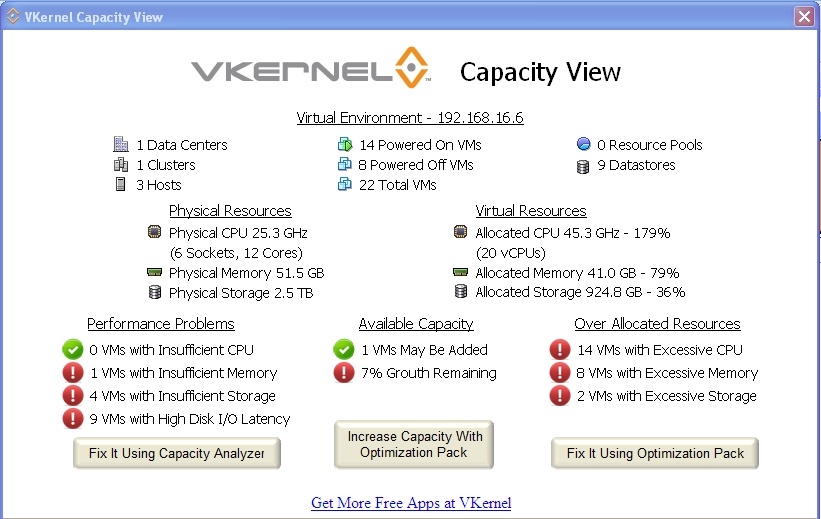
I thought you might be interested in the new fee tool that VKernel released today. Capacity View provides quick visibility and alerting to the storage and server capacity issues in your VMware virtualized infrastructure. This powerful tool is a desktop app that downloads in 2 minutes and can be connected to ESX, vCenter or VKernel's VM Stats or Optimization Pack applications.
Capacity View identifies capacity based performance issues such as virtual machine I/O latency or under-allocated CPU, memory or storage. Additionally, it monitors your available capacity for new VM deployments and shows you which over-provisioned VMs can be rightsized to free up wasted capacity.
http://www.vkernel.com/solutions/capacity-view

VCPgeeks Welcome Note

Hi Guest,

It's my pleasure to see you on VCPgeeks.blogspot.com
This Blog is intended for sharing of VMware Concepts, Troubleshooting, Design at this point

Yeah, however I believe a Long Journey or any Journey should start with a single step..
Starting ahead is half success, your suggestions or contributions are welcome to make it more brighter..

Enjoy the Cool Stuff on Right Pane --> (Blog Archives)

Cheers - Purna Chandra :-)